
XEI.ItemGenerator – Installation, License, Menus and Authorizations
Requirements
| SAP Business One | 10.0 or later |
| Database | Microsoft SQL Server or SAP HANA (on SAP HANA, a test during installation is recommended) |
| System | Microsoft .NET Framework 4.8 on the SAP client PC |
| Program languages | Italian, English, German, French, Spanish |
Installation
- Download the
XEI.ItemGenerator.zippackage. - In SAP Business One open the Extension Manager, import the package and assign it to the company.
- On first start the add-on creates its tables, fields, objects and authorization entries by itself.
- When it has finished, restart the SAP client once: the base and variant windows read the add-on fields when SAP starts.
Each add-on update is installed the same way, with the same restart.
License
The add-on works with a license code issued by XEI.
- Trial: after requesting the trial you receive by email a trial code, valid for 30 days from sending in any company.
- Purchase: you send XEI the two codes of the Licenza (License) window and receive the license code.
The Licenza (License) window:
- Without a valid code the add-on is locked: its menu contains only Informazioni (About) and Licenza (License), and at startup the Licenza window opens by itself with the status and the reason.
- The window shows the company code and the server code: to purchase the license, with Copia (Copy) you send them to license@xeisrl.com.
- An SAP superuser pastes the code received into Inserisci un codice di licenza (Enter a license code) and presses Salva codice (Save code): the add-on is unlocked immediately, without restarting SAP.
- The trial code is valid in any company. The license code is valid for the company (database) or the server of the codes sent.
- The same window opens at any time from the Licenza menu: status, expiry date, number and scope of the license.
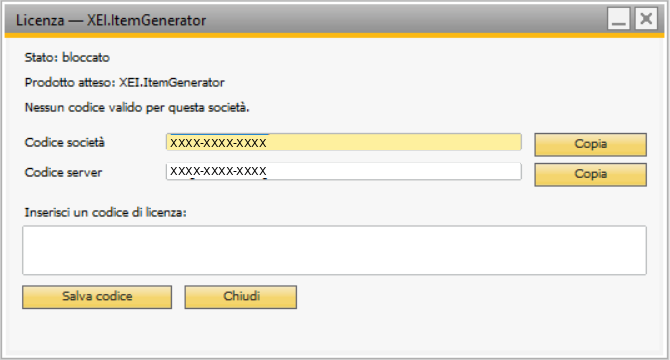
The Licenza (License) window with the add-on locked: reason, company and server codes, field for the code.
Menus
The entries are in Modules › Administration › Add-Ons › XEI-Addon › Code Configurator and, the same, in Inventory › Item Management › Code Configurator.
| Entry | Function |
|---|---|
| 0. Settings | add-on options (user manual, chapter 3) |
| 1. Base Definition | bases and values: the code tree (chapter 5) |
| 2. Variants and Options | variants with their options (chapter 4) |
| 3. Variant Structures | groups of variants to ask for a value (chapter 4) |
| 4. Generate Items | composition and creation of the items (chapter 9) |
| 5. Consistency Check | recalculation of the compositions of the generated items (chapter 14) |
| 6. Check Configuration | check of the whole configuration (chapter 12) |
| 7. Excel Import / Export | configuration in an Excel file (chapter 13) |
| Informazioni, Traduzioni, Licenza (About, Translations, License) | entries common to all XEI add-ons, shown in Italian (only under XEI-Addon); Licenza: license status and code |
With a right-click there are also Configure Item... on the rows of sales quotations and sales orders (chapter 10) and Generate Similar Items... in the Item Master Data of a generated item (chapter 11).
Authorizations
In Administration › System Initialization › Authorizations › General Authorizations the add-on adds the Configuratore codici XEI branch. For each entry you can assign Full Authorization, Read-Only Authorization or No Authorization. Superusers always have full access.

The configurator branch in General Authorizations, for a user with no authorizations.
| Entry | Full | Read-only |
|---|---|---|
| Definizione basi | edit the bases | view |
| Definizione varianti | edit the variants | view |
| Strutture varianti | edit the structures | view |
| Generazione articoli | create items (also from sales quotations and sales orders) | compose the list without creating |
| Configurazione, verifica, import/export | save the settings, import from Excel, consistency check | view the settings, check, export |
Without authorization the menu entry shows "Function not authorized" in the status bar.
Support
For licenses: license@xeisrl.com. For support: info@xeisrl.com. In your request, state the add-on version (Informazioni menu) and describe the problem.